Text-to-Speech AI vs. Traditional Voiceover: Which is Right for You?
Voiceovers are used everywhere today—in videos, advertisements, customer support, education, and even in our favorite mobile apps. When creating content, people often have two main options: they can use a Text to Speech (TTS) AI tool or hire a traditional voiceover artist. Each choice has its own strengths and weaknesses.
In this article, we will break down the differences between TTS AI and traditional voiceover, so you can decide which one is best for your needs.

What is Text-to-Speech AI?
Text to Speech AI is a technology that can take written text and read it aloud using computer-generated voices. These voices are created by artificial intelligence (AI) programs that “learn” to sound like a human.
Text-to-Speech AI has become more common and popular in recent years. In fact, you probably hear AI voices in daily life—maybe when using a GPS, talking to a virtual assistant like Siri, or even listening to automated customer support.
AI voices have improved a lot, too. Many TTS voices now sound natural and pleasant, though they still lack some of the warmth and emotions that come naturally to humans.
What is a Traditional Voiceover?
A traditional voiceover is a recording done by a human voice artist. These are professional people who have trained their voices for narration, acting, or advertising. You’ll hear traditional voiceovers in commercials, audiobooks, movies, and some video content.
They add personality, feeling, and meaning to a message, making it feel unique and more engaging.
The process of creating a traditional voiceover involves several steps: hiring the voice artist, recording in a studio, editing, and possibly adding background music or effects.
This work makes the voiceover sound polished and professional.
Comparing Text-to-Speech AI and Traditional Voiceover
Now that we know what each option is, let’s compare them based on some important factors: cost, time, quality, customization, and scalability. 1.
Cost
One big difference between TTS AI and traditional voiceovers is cost.
Text-to-Speech AI is generally more affordable. Most TTS services have monthly or annual fees, but once you pay, you can use the voices as much as you want.
Some video editors for PC, like the CapCut desktop video editor, are even free or offer free versions. You don’t need to pay for a recording studio, equipment, or a professional voice artist.
Traditional voiceover, on the other hand, can be more expensive. This cost includes paying the voice artist, booking studio time, and editing the recordings. High-quality voice artists charge more, especially if they are well-known. However, if you’re looking for a unique, personal sound, this investment can be worth it.
Turnaround Time
Turnaround time is the time it takes to produce the final voice recording.
Text-to-Speech AI wins here as well, as it is much faster. You simply type or upload your script, and the AI instantly reads it out loud. You can have a full voiceover in minutes, making it great for projects with tight deadlines.
Traditional voiceover takes more time. First, you must find the right voice artist, record the script, and edit the recording. This process can take days or even weeks, depending on the project’s complexity and schedule.
Voice Quality and Natural Sound
Quality is where traditional voiceovers often have an advantage.
Text-to-Speech AI has improved greatly and now sounds pretty natural. However, AI voices still don’t always capture the same emotional depth or warmth as a human.
Some TTS voices can sound a bit flat or robotic, especially when it comes to expressing subtle emotions.
Traditional voiceover delivers a high level of naturalness. Human voices are full of expression, allowing them to convey joy, sadness, excitement, or suspense in a way that feels real.
Voice artists can adjust their tone, speed, and style to match the mood of the message, making the content more engaging and memorable.
Customization and Personalization
Being able to customize and personalize a voice can make a big difference.
Text-to-Speech AI provides a range of voices, and you can usually select different accents, languages, or tones. However, these options are often limited to the voice choices available in the TTS tool.
For example, if you need a very unique or distinct voice, it may not be possible to find it in AI.
Traditional voiceover allows for complete customization. Voice artists bring their own style, and you can give them specific instructions to make the voice match your brand’s tone or your project’s mood.
For projects that need a custom feel, a traditional voiceover is usually the better choice.5.
Scalability and Reusability
Scalability is about how easily a voice solution can be used again or for different purposes.
Text-to-Speech AI is extremely scalable. It’s easy to adjust scripts, make updates, or create multiple versions in different languages or accents. This can be very useful for businesses that need the same message in different languages or for ongoing updates.
Traditional voiceover can also be reused but is usually less flexible. If you want to create multiple versions of the same recording in different languages, you’ll need to hire multiple voice artists. This can add time and cost.
How to Use Text to Speech AI Feature of the CapCut Desktop Video Editor
Using the Text-to-Speech AI feature in CapCut’s desktop video editor is a quick and easy way to add a voiceover to your videos without needing to record audio yourself. Here’s how to use this tool to enhance your content:
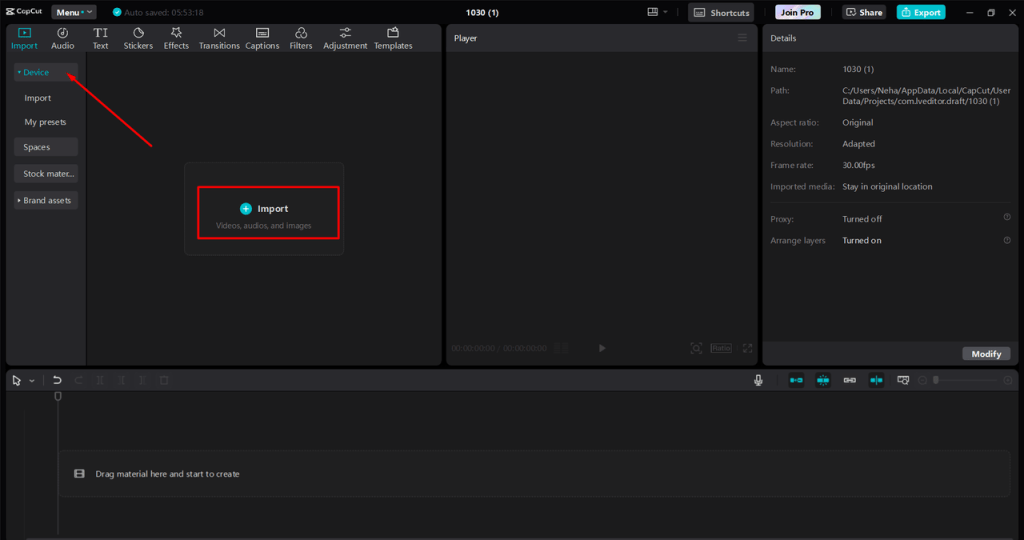
Step 1: Import Your Video
Open the CapCut desktop video editor and start a new project. Click on “Import” and select the video file you want to edit. Once imported, drag your video to the timeline at the bottom of the screen to begin editing.
Step 2: Add Text-to-Speech AI
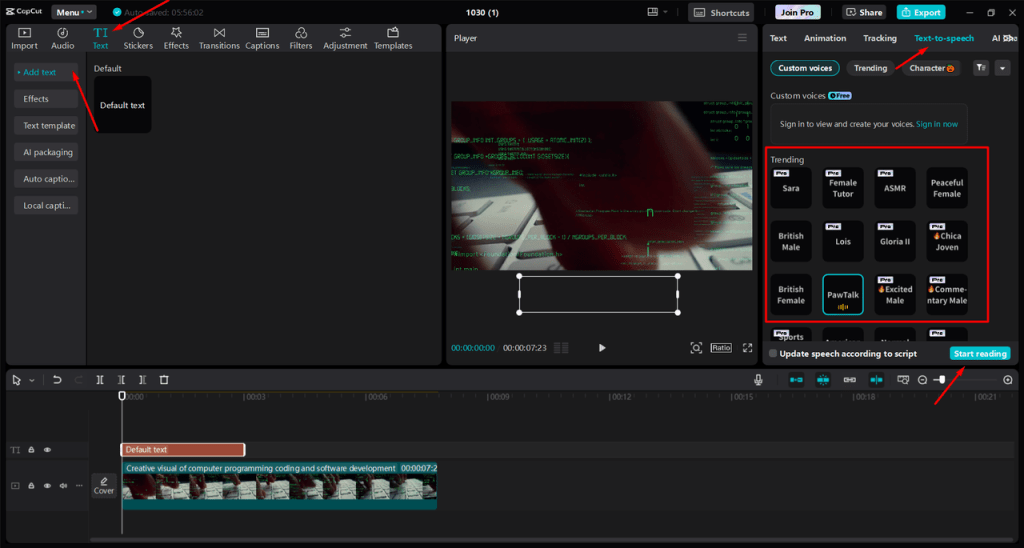
Then, go to the Text > Add Text to type out the script you want as audio in your video. After typing the text, look for the “Text-to-Speech” option on the right panel. Select this feature, and choose from the list of available AI voices to match your video’s tone.
Click “Start reading” to convert your typed text into audio. The CapCut desktop video editor will automatically add the generated voiceover to your timeline. Moreover, you can use other features like auto captions, background remover, filters and effects and many more to make your video more professional and accessible.
Step 3: Export Your Video
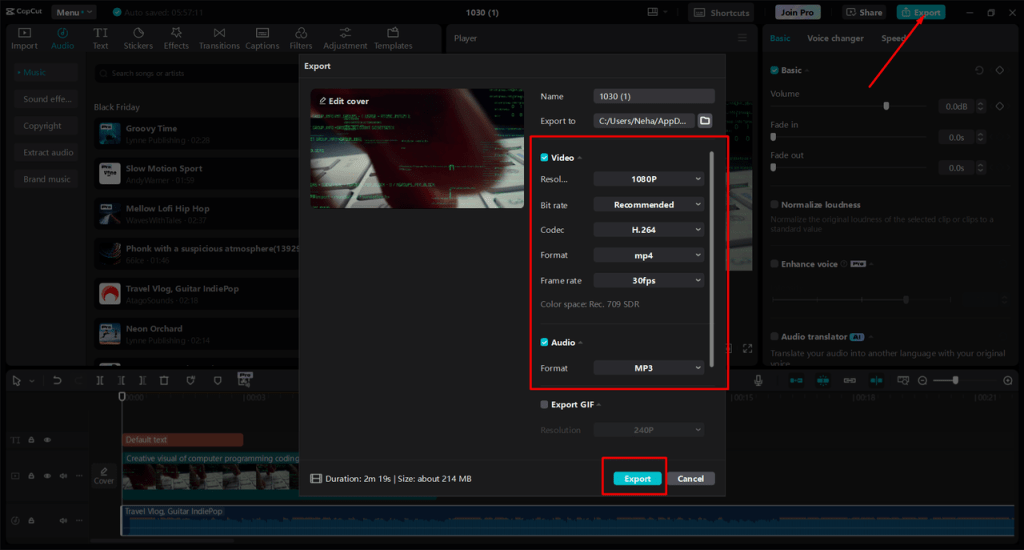
When you’re satisfied with the voiceover and other edits, click on the “Export” button in the top right corner.
Select your preferred video quality and export settings, then hit “Export” to save your final video file with the Text-to-Speech AI included.
Conclusion
Choosing between Text-to-Speech AI and traditional voiceover depends on what you need for your project. If you want something quick and budget-friendly, TTS AI might be perfect.
But if quality, emotion, and uniqueness matter most, a traditional voiceover can give you exactly what you need.
By understanding what is better for you, you can make the right choice for your project and give your audience the experience they deserve.
Making English Fun!

I have been a teacher of English for over 15 years, in that time i made hundreds and thousands of resources and learnt so much i think its worth sharing. Hopefully to help teachers and parents around the world.